
manager_id, and everything else
follows.
Manager
The margin model applied to your subaccount — Standard (cross collateral margin) or
Portfolio (scenario-based netting). You choose one via
manager_id at subaccount creation.Risk universe
A risk-containment boundary. A universe’s collateral, open-interest, and lending rules are its
own, and losses are socialized only within it — so trades never cross universes.
How they relate
- A subaccount can only have one manager.
- A manager belongs to exactly one universe.
- A universe exposes at most one Standard and one Portfolio manager.
- You choose a
manager_id; that fixes both your margin model and your universe.
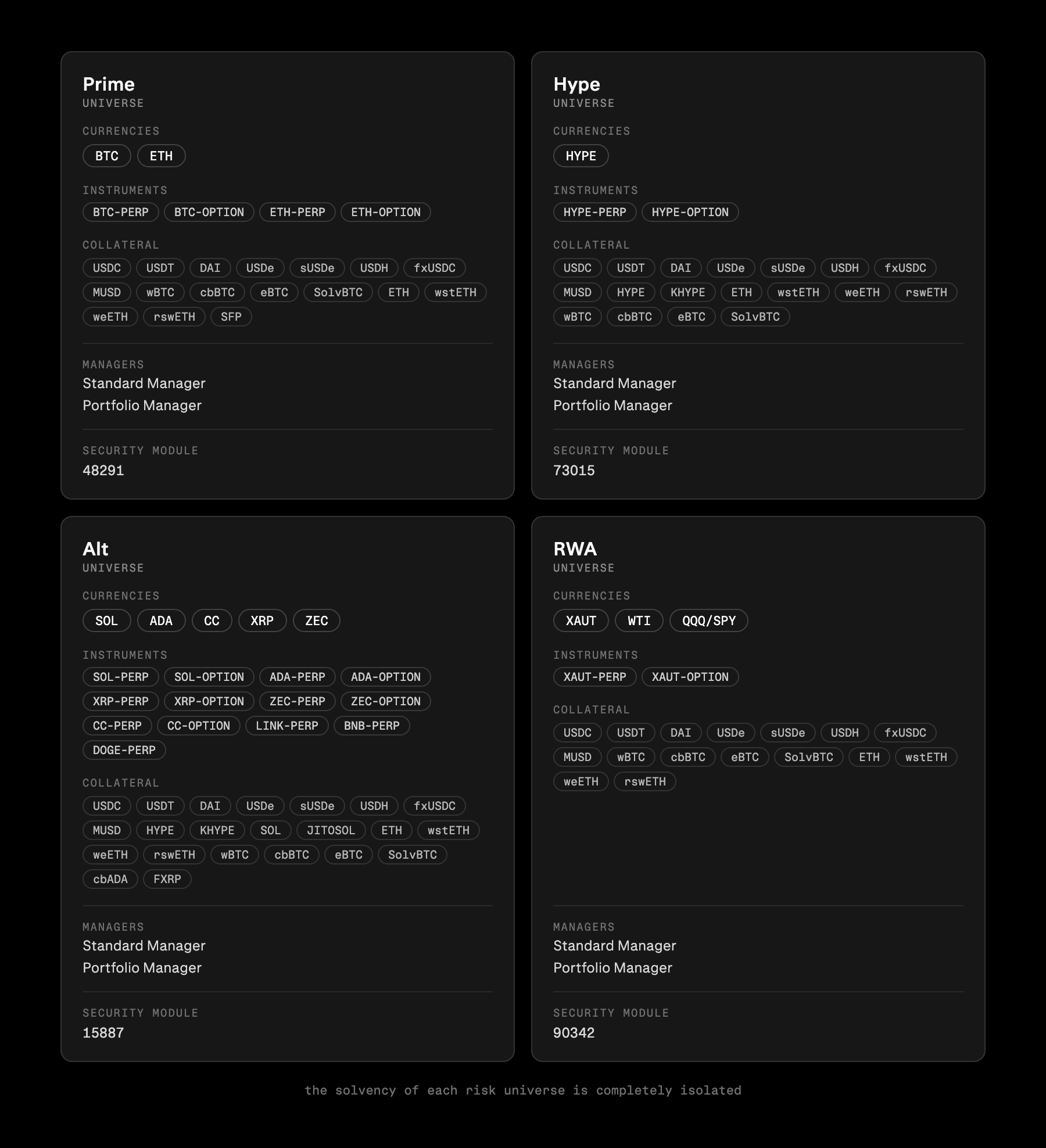
public/get_all_currencies section below to get the latest breakdown of managers and risk universes.
Managers
A manager is the margin engine that risk-prices your subaccount. There are two:
Each manager has a numeric
manager_id. A subaccount stores its manager_id and derives its
universe, tradeable instruments, and accepted collateral from it. Picking Standard vs Portfolio for
the same book changes your margin requirement, not what you can hold.
Risk universes
A risk universe is a set of assets and managers that share a single risk boundary. It exists so that an insolvency in one universe can only ever be absorbed by that universe’s own Security Module and, if needed, socialized to solvent accounts inside the same universe — never across the whole exchange. As a direct consequence, a trade, RFQ, or liquidation is rejected if the two sides sit in different universes. Everything risk-related is keyed by(asset, risk_universe_id): collateral discounts, OI caps, and
lending pools can all differ per universe for the very same asset.
The fallback universe
Universe0 is a special fallback (“lost-and-found”) universe: a no-margin holding area whose
only job is to safely custody collateral that has nowhere else to go. It registers every spot asset
but supports no trading, borrowing, options, or perps.
Every wallet is given a single fallback subaccount when its account is created. A deposit lands there —
instead of the subaccount you intended — whenever it can’t be honoured as requested:
- it targets the fallback manager (
manager_id0), - the asset isn’t registered in the target manager’s universe, or
- the amount is below the subaccount-creation fee.
private/transfer_spot.
Reading public/get_all_currencies
public/get_all_currencies (no params; public/get_currency for a single one) is the source of
truth for what is supported where. Each currency lists its managers per universe and its assets’
risk per universe, so a single response tells you which manager_id to use and what you can trade
or post against it.
Response (abridged, one currency)
risk_universe_id — match it across managers[], option/perp.universes[],
and spot[].universes[] to read one universe consistently.
market_type is a quick summary of the enabled classes; the authoritative check is which of
option / perp / spot are actually populated.
A currency can register several spot assets — e.g. a lending
USDC and a non-lending USDC-NL. They appear as
separate entries in spot[] with their own discounts and lending, so check the specific name/address you intend
to deposit.Picking your manager
1
Choose currency and universe
Find the currency and the
risk_universe_id you want to trade in (typically the main universe, 1).2
Take the manager id
From that universe’s
managers[] entry, use sm for Standard (isolated) margin or pm for Portfolio margin.3
Confirm your collateral
Check the asset you plan to post has a non-zero
srm_im_discount (for sm) or pm2_im_discount (for pm) in the
same universe. "0" means that manager won’t count it as collateral.4
Create the subaccount
Pass the chosen id as
manager_id when depositing to a new subaccount (see Depositing). Universe,
instruments, and collateral set all follow from it. You can read them back on
private/get_subaccount via its manager_id and risk_universe_id.